Today we’re launching Routines, a new way to put the Omni Agent to work on a schedule. Write a prompt, something like “summarize yesterday's closed won deals by rep and flag anything that slipped to next quarter,” pick a cadence, and Omni runs the analysis and sends you an answer at your preferred destination.
Routines don’t query the warehouse directly. Each run compiles the prompt through the semantic layer, which means the agent inherits everything your team has already modeled: join paths, metric definitions, field-level access rules.
When a Routine reports on “closed won,” that phrase resolves to the same measure your dashboards compile to, because it is literally the same measure. This is what makes the output safe to act on without rereading the SQL each morning. The agent can’t invent a definition, and because each Routine executes as the user who created it, it can’t return anything that the user couldn’t already query themselves.
What is a Routine? #
Until now, AI analysis has worked on a “pull” model. You ask, it answers.
That works for exploration, but the questions that matter most are rarely one-offs. They're the same question, every week: How did signups trend? Where did revenue land? What changed since last time? Routines flip the model from “pull” to “push". They’re recurring analyses that happen without needing a human to be in the loop.
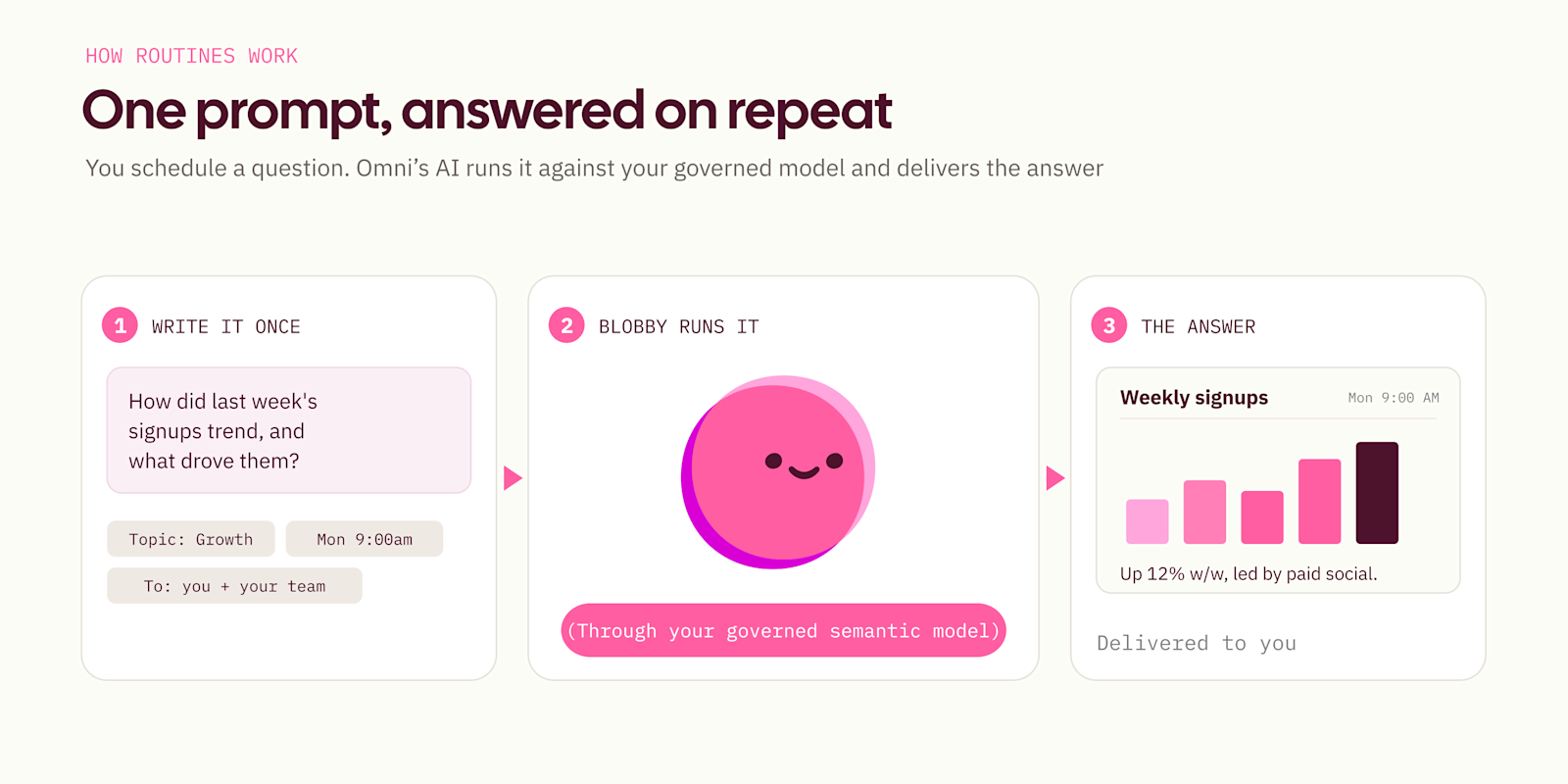
You configure Routines in plain language, choose a model and Topic, set how often you want it to run, and where it should be delivered. When it is time to send, Blobby (Omni’s agent) runs your prompt against your governed semantic model, leveraging those codified and approved definitions from your data team. Then it sends the result as a clean, formatted report.
This is where a Routine parts ways from a dashboard delivery.
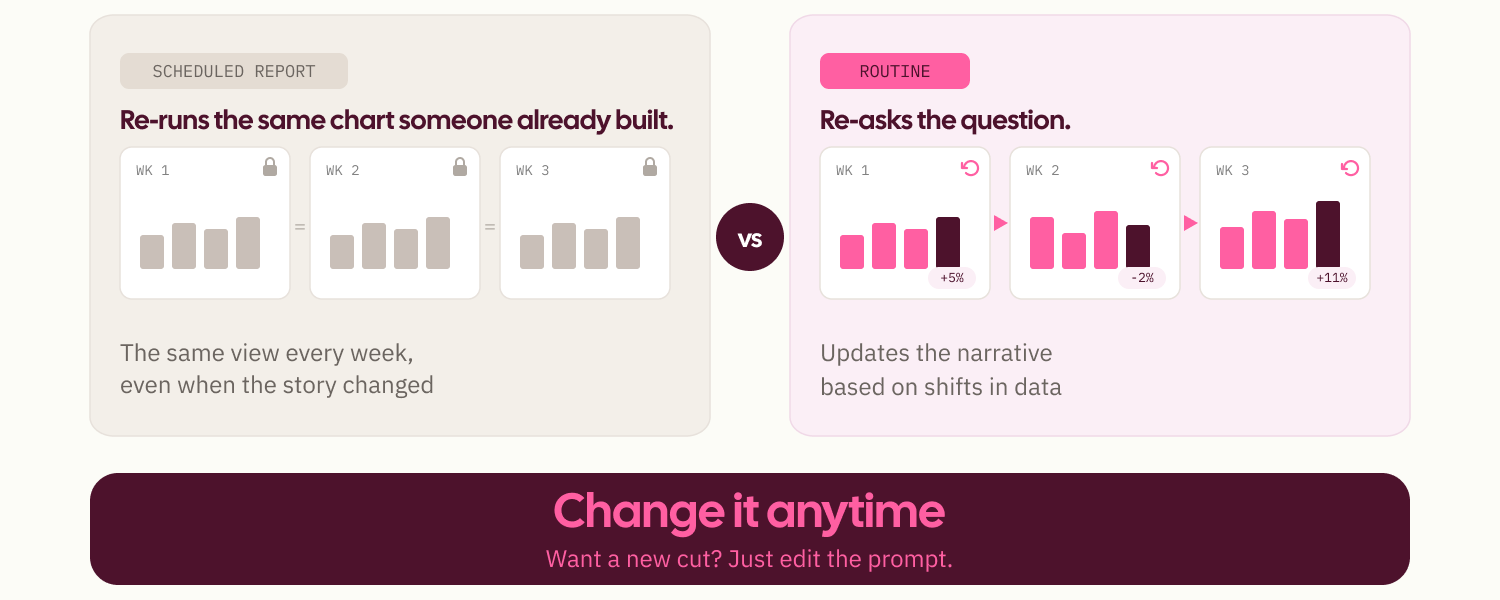
A dashboard delivery sends a user a PDF of the latest data in a known format and structure on a given schedule, allowing them to do with it what they wish. In some cases, this leaves the user to re-interpret the takeaways or answer their own questions if the “so what” isn’t immediately apparent.
A Routine solves this problem, allowing a user to re-ask their exact question on the same cadence. When last week looks different, you get fresh data and a fresh explanation of what changed. When you want a new cut of that analysis, you just quickly edit the prompt in plain language rather than building more charts or tables on a dashboard.
How AI context shapes Routines #
The semantic model supplies the what: fields, joins, definitions, and access controls. Omni's AI context supplies the how. It captures the additional context that doesn't typically live in your data warehouse, such as how business users phrase questions, sample queries, and values that help AI understand how to use the fields defined in your model. This allows for reliable multi-step analyses run like an analyst.
“Your stakeholders often have analytical questions that are complex, but predictable. These are those multi-step analyses that come up again and again. The semantic layer gives you the building blocks — the fields, joins, and metric definitions. But it doesn’t tell the AI how to assemble them for a specific kind of question; that’s where Omni’s AI context comes in.” — Sarah Fischbach, Staff Analytics Engineer, Checkr
One prompt can evolve into dynamic and autonomous workflows.
Let's say you run growth. Every Monday, you want to know how last week's signups compared to the week before, which channels drove them, and whether anything stands out. Build the Routine and every Monday at 9am, Blobby runs the analysis against your governed model and sends it.
Where your answers land
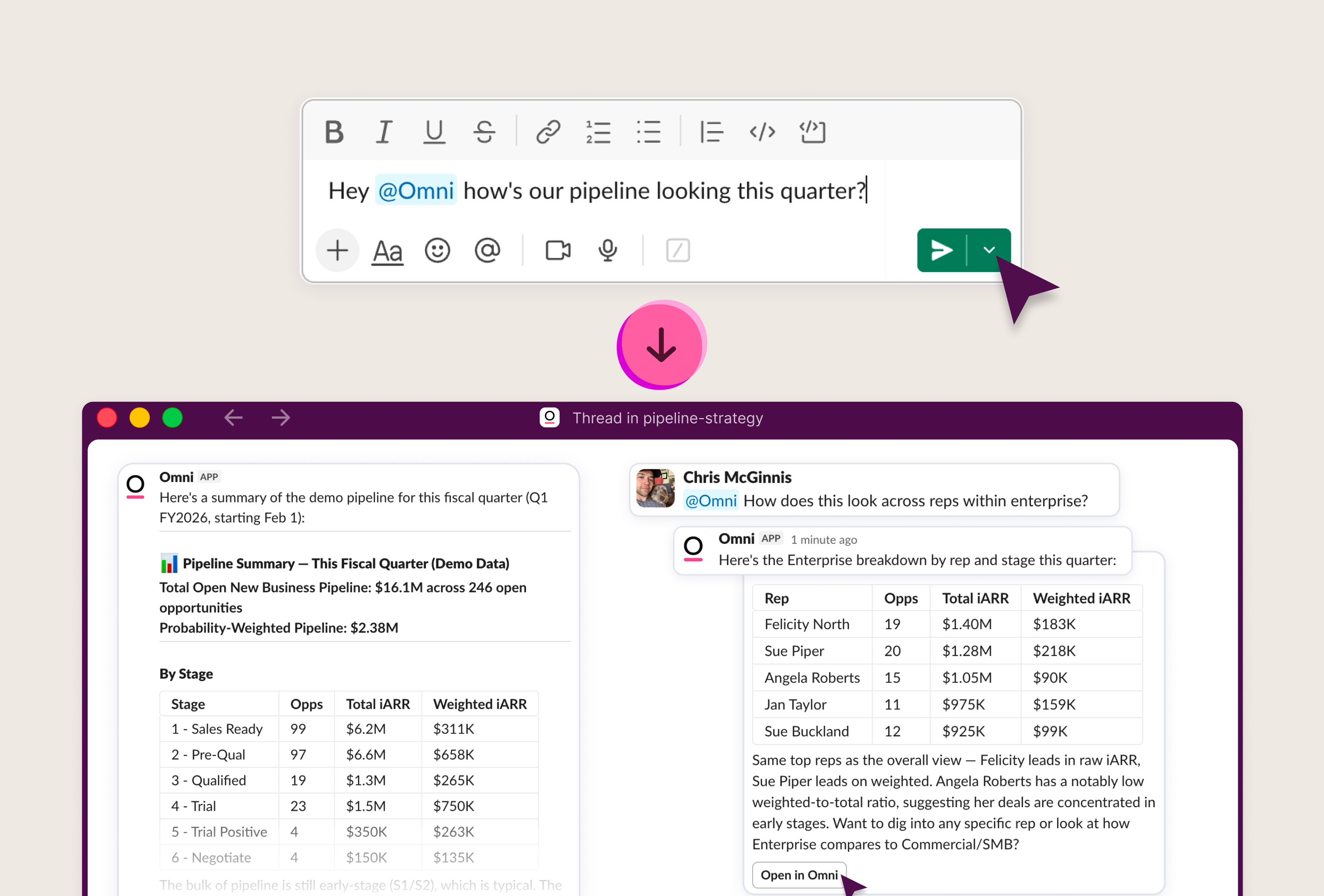
Today, Routines either deliver to your inbox as a clean, formatted report or into Slack as a new message and thread. For Routines that land in Slack, users can also continue the conversation with Omni’s Slack Agent to ask follow-ups and dig deeper based on the response.
How to set one up
From the UI
Open the Routines page and click New Routine.
Give it a name, write your prompt, choose the model and Topic, select your destination, choose a channel or recipients, and set the schedule. From the Routines control pane, you can edit, pause, resume, or delete a Routine whenever you like.
With the AI Agent, Blobby (coming soon)
In the coming weeks, you’ll be able to just ask for the Routine that you’d like, and it will create it for you. We recommend testing this and then refining it with a follow-up prompt or by hand in the UI to set up exactly what you want. You can then navigate to see the Routine it created directly from the chat interface.
This isn’t limited to just working directly in Omni. Anywhere you call Omni’s AI Agent, you can create a Routine: via API, CLI, MCP, or Slack.
Via the API, CLI, Omni Agent Skills, or Slack
Routines have a plain, authenticated REST endpoint, which means they're fully programmable. Anything that can make an HTTP call can create a Routine, including via our CLI that helps streamline our APIs for humans and agents alike. This means that Routines can be called via a script, your own tooling, or even an AI coding agent like Claude Code.
The schedule is a standard cron expression, and the timezone is any IANA zone, so "9am Monday in New York" means exactly that. A single Routine can email up to 100 recipients. The full lifecycle is there too. You can list your Routines, fetch one, update it, or delete it, then manage them however you like.
Examples to make the most of Routines #
Weekly numbers, automatically: "How many users signed up last week?" emailed or Slacked to you and your team every Monday at 9am.
Team KPI digests: Send the board metrics to your exec team email list on a weekly basis during the quarter for better monitoring, rather than just an end-of-quarter review.
Align your teams and orient stakeholders around data: Send the most common repeat questions in your ad hoc requests to Slack weekly to help users self-serve before they have to ask.
Keep your reps accountable: Slack each rep their current pipeline and quarterly performance, framed around a recommendation to ground weekly 1:1s, all where they already work.
New product feature adoption: Monitor product usage and user funnels to see where users fall off in activation and adoption flows, and suggest actions sent out to product area owners and related engineering teams in product launch Slack channels.
What’s next #
We're excited to launch the first agentic Routine experience fully backed by an enterprise-grade semantic and governance layer, but we're not stopping here. Today, AI helps surface insights, and in the future it will also be able to take the right action, truly acting as a senior data team member.
Beyond a set schedule, Routines will run on conditions too, firing when there's an anomaly to surface rather than only when the clock says so. The dial on agency keeps turning, too: beyond answering the question asked, Blobby starts to suggest changes, like model and context updates that sharpen future answers. Further out is acting autonomously within guardrails and scope, letting Blobby more fully take the wheel.
The first step begins today with your first Routine.
Get started #
Routines are available now. Head to the Routines page to create your first one, or hit the API to wire it into your own workflows. See the docs →